Anilox Roller Guide.
Master Your Ink Transfer.
The anilox roller is the heartbeat of flexo printing — it controls ink volume, consistency and print quality. This guide covers roller selection, cell geometry, BCM/LPI, maintenance, cleaning and troubleshooting to help you optimize every print job.
Position:HOME > RESOURCES > Anilox Roller Guide
What is an Anilox Roller?
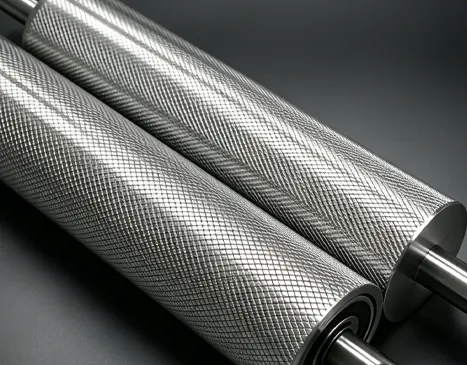
The anilox roller is a precision-engineered cylinder with thousands of tiny cells (engraved cavities) that carry a controlled volume of ink from the ink pan to the printing plate. It is the metering device that determines:
- Ink film thickness — directly affects color density and coverage
- Print consistency — uniform cell structure = uniform ink transfer
- Dot gain & image sharpness — finer cells = sharper details
StarColor provides free anilox audits — we measure cell volume, screen count and condition to help you select the right roller for every job.
Key Parameters
LPI · BCM · Cell angle · Engraving type
📊 Anilox Selection Guide
Choosing the right anilox roller depends on your ink system, substrate, and print quality requirements. Use this table as a starting point — our technical team can refine the selection based on your specific press conditions.
| Application / Ink Type | Recommended LPI (lines/inch) | BCM (billion cubic microns) | Cell Angle | Notes |
|---|---|---|---|---|
| Water-based flexo - paper/board | 200 - 360 | 4.0 - 8.0 | 60° or 30° | Higher LPI for finer details, lower for solid coverage |
| Water-based flexo - films | 360 - 550 | 2.5 - 5.0 | 60° | Fine cells reduce film thickness for fast drying |
| UV flexo - labels & packaging | 400 - 700 | 1.8 - 4.0 | 30° or 60° | High LPI for sharp images, low BCM for UV cure |
| Solvent-based gravure (engraved cylinder) | 50 - 200 | 10 - 30 | 45° (pyramid) | Gravure uses different engraving technology |
| Metallics / opaque whites | 180 - 280 | 6.0 - 12.0 | 60° | Higher volume for pigment loading |
| High-speed printing (>400 m/min) | 300 - 500 | 2.0 - 4.5 | 30° | Lower volume to reduce drying load |
🔬 Anilox Cell Geometry & Engraving Types
60° Hexagonal
Most common — excellent ink release, good cell volume uniformity. Suitable for most flexo applications: paper, board, films.
- High cell density
- Good ink transfer efficiency
- Wear resistance
30° Hexagonal
Deeper cell walls, higher volume capacity. Often used for UV inks and high-opacity whites where ink release needs more energy.
- Higher cell volume
- Better for high-viscosity inks
- More demanding to clean
45° Pyramid (Gravure)
Traditional gravure engraving — deep, uniform cells. Used for solvent-based inks on gravure presses.
- Deep cell structure
- High ink capacity
- Not typical for flexo
📌 Ceramic vs. Chrome: Ceramic anilox rollers (laser-engraved) offer superior wear resistance and cell uniformity. Chrome rollers are lower cost but wear faster.
🧹 Anilox Maintenance & Cleaning Guide
A clean, well-maintained anilox roller is essential for consistent print quality. Follow these best practices to extend roller life and reduce defects.
🔄 Daily Cleaning
- Use anilox-specific cleaning brushes (nylon or brass)
- Run a cleaning solution compatible with your ink system
- Rotate the roller during cleaning to access all cells
- Rinse thoroughly with water or solvent
🧪 Deep Cleaning
- Ultrasonic cleaning — removes dried ink from cell bottoms
- Chemical stripping — for stubborn build-up (ceramic-safe)
- CO₂ blasting — gentle, non-abrasive cell cleaning
- Frequency: weekly or bi-weekly depending on production
🔬 Inspection & Measurement
- Use a microscope to check cell walls for wear
- Measure cell volume periodically — loss >10% = replace
- Check for cell plugging — appears as white streaks on print
- Document roller history (cleaning cycles, wear)
🔧 Anilox Troubleshooting Guide
Common print defects and their anilox-related root causes:
| Print Defect | Likely Anilox Cause | Recommended Action |
|---|---|---|
| White streaks / banding | Cell plugging, uneven wear | Deep clean, measure volume, replace if worn >10% |
| Inconsistent density / mottling | Uneven cell volume across roller | Inspect for wear, re-engrave or replace |
| Scratches on print | Foreign material, damaged cell walls | Polish or replace, check doctor blade for debris |
| Ink starvation (pinholes) | Low BCM for ink type / substrate | Increase anilox volume or change screen count |
| Excessive dot gain | Anilox volume too high | Switch to lower BCM / higher LPI |
| Poor adhesion / rub resistance | Film thickness too high (over-inking) | Reduce anilox volume |
🏭 Case Study: Corrugated Box Printing — Insufficient Solid Density & Weak Print Coverage
A major corrugated packaging manufacturer in South China was running a 250 LPI / 7.0 BCM ceramic anilox roller for solid color block printing. Recently, they experienced frequent issues including insufficient solid ink density, weak print coverage, and pinholes/white spots, with the rejection rate climbing to 8%. The company tried changing inks and adjusting printing pressure, but neither approach brought significant improvement.
Diagnostic Process: StarColor's technical team visited the site and inspected the anilox roller using a microscope. The inspection revealed extensive cell plugging (dried ink and resin deposits clogging the bottom of the cells) and cell wall wear. Using an Anilox Volume measurement instrument, the actual BCM was found to have dropped from 7.0 to 5.2 — a loss of over 25% in effective ink carrying capacity.
Root Cause: The manufacturer had been using alkaline cleaning agents combined with manual brushing over an extended period. This method failed to thoroughly remove the cured resin and pigment deposits at the bottom of the cells. Additionally, the anilox roller had been in service for over 8 million impressions, far exceeding the recommended replacement cycle of 5-6 million impressions for ceramic anilox rollers.
Solutions Implemented: ① Performed ultrasonic deep cleaning on the roller, restoring cell volume to 6.8 BCM; ② Established an anilox roller lifecycle management system, tracking impression counts and volume degradation data for each roller; ③ Arranged laser re-engraving for the backup roller of the same specification as a replacement strategy; ④ Revised the cleaning procedure — switched to neutral cleaning agents combined with ultrasonic cleaning equipment, with deep maintenance performed weekly.
Results: After cleaning, the solid density improved from 1.35 to 1.65 (meeting the company's quality standard), and the weak coverage issue was completely resolved. The rejection rate dropped from 8% to below 0.5%. Furthermore, with the impression tracking system in place, the company was able to proactively plan re-engraving schedules for 3 anilox rollers, avoiding unexpected press downtime and preventing delivery delays.
Frequently asked questions — Anilox Rollers
❓ What LPI should I use for my application?
For paper/board: 200–360 LPI. For films: 360–550 LPI. For UV inks: 400–700 LPI. Higher LPI = finer details, lower LPI = more ink volume for solids.
❓ How do I know when to replace an anilox roller?
Measure cell volume. If volume loss >10–15% from original spec, or if cell walls are damaged/worn, it's time to replace or re-engrave.
❓ Can I use the same anilox for different ink systems?
Yes, but cleaning must be thorough. Water-based and UV inks have different cleaning requirements. We recommend dedicated rollers for different ink families.
❓ Does StarColor provide anilox auditing services?
Yes. Our technical team visits your plant to measure cell volume, inspect wear, and recommend the optimal roller for each job. This service is free for qualifying customers.
Get your anilox roller performing at its best.
Request a free anilox audit, cleaning consultation, or roller specification recommendation — we'll help you achieve consistent, high-quality prints.